

Before you start
- You need Owner/Admin access to manage Team.
- Do not send invitations, approve weeks, or change statuses when you are only reviewing.
- Use realistic US-market data when you need to add services or notes.
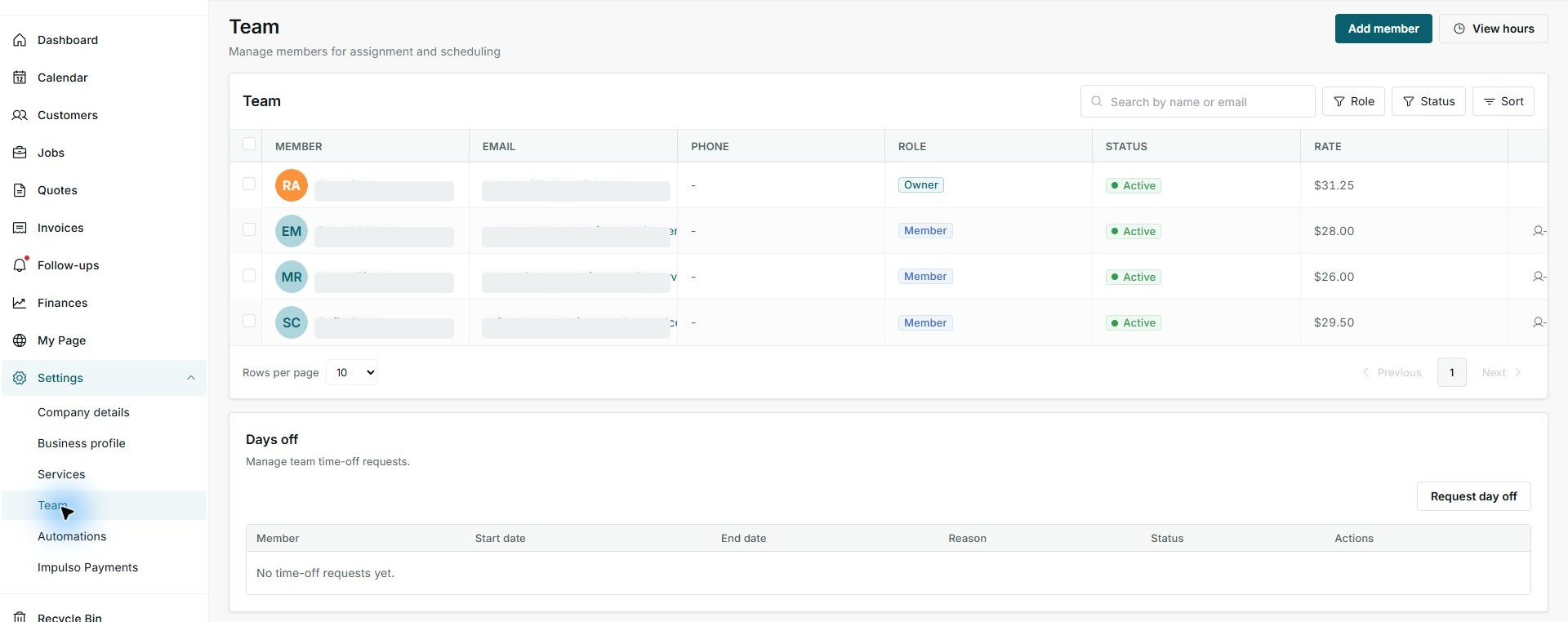
1. Open Team
- Go to Settings.
- Open Team.
- Review members, role, status, and rate before adding someone.
2. Complete the invitation
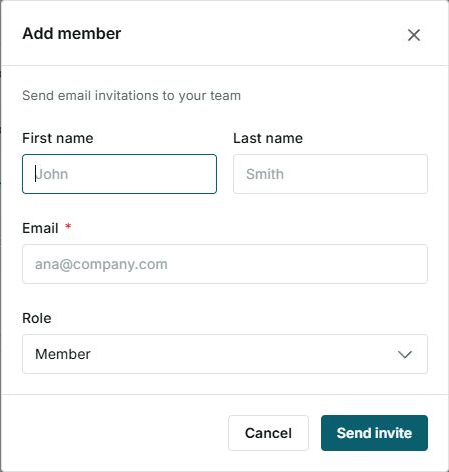
- Click Add member.
- Enter first name, last name, and email.
- Choose the right role before sending.
3. Send only when ready
- Check that the email has no typo.
- Confirm the role is correct.
- Click Send invite only when you want to send the email.
Statuses and options you may see
- Owner
Meaning: Manages the account and main options.
Next step: Use this role only for someone who should control the business.
- Member
Meaning: Can work from assigned areas.
Next step: Use this role for operational staff.
- Active
Meaning: The person can appear in assignments and reviews.
Next step: Keep it active if they still work with you.
- Send invite
Meaning: Sends the access email to the new member.
Next step: Do not click it until details are reviewed.