

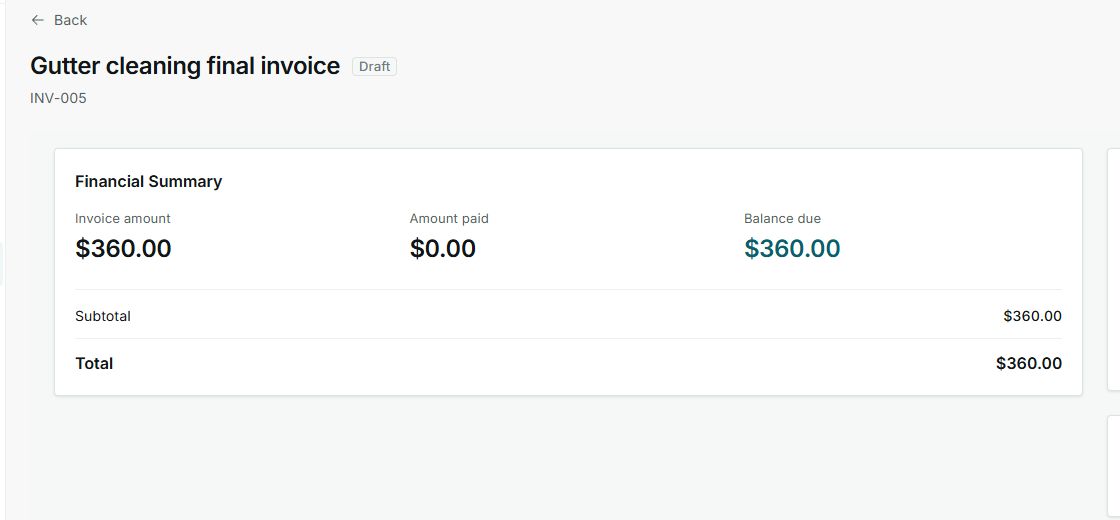
1. Read the Financial Summary
- Open the invoice from the list.
- Review Invoice amount, Amount paid, and Balance due.
- Confirm subtotal and total.
- Use the status to decide whether to send, collect, or follow up.
States You May See
- Draft
Meaning: The invoice exists, but it has not been sent to the customer yet. Where it appears: Invoice list and detail. Next step: Review and send it when ready. It does not mean: It does not mean the customer received it.
- Sent
Meaning: The invoice was sent to the customer and may still need payment. Where it appears: Invoice list and detail. Next step: Follow up or record payment when appropriate. It does not mean: It does not mean it is paid.
- Paid
Meaning: The invoice has no remaining balance. Where it appears: Invoice list and detail. Next step: Review history or receipts if needed. It does not mean: It does not automatically change the job status.
- Balance due
Meaning: There is still an amount to collect. Where it appears: Financial summary. Next step: Record payment or send a reminder when appropriate. It does not mean: It does not mean the customer viewed the invoice.