

Before you start
- You need Owner/Admin access to manage Team.
- Do not send invitations, approve weeks, or change statuses when you are only reviewing.
- Use realistic US-market data when you need to add services or notes.
1. Choose the week
- Open View hours from Team.
- Use the arrows to move between weeks.
- Confirm the date range before making decisions.
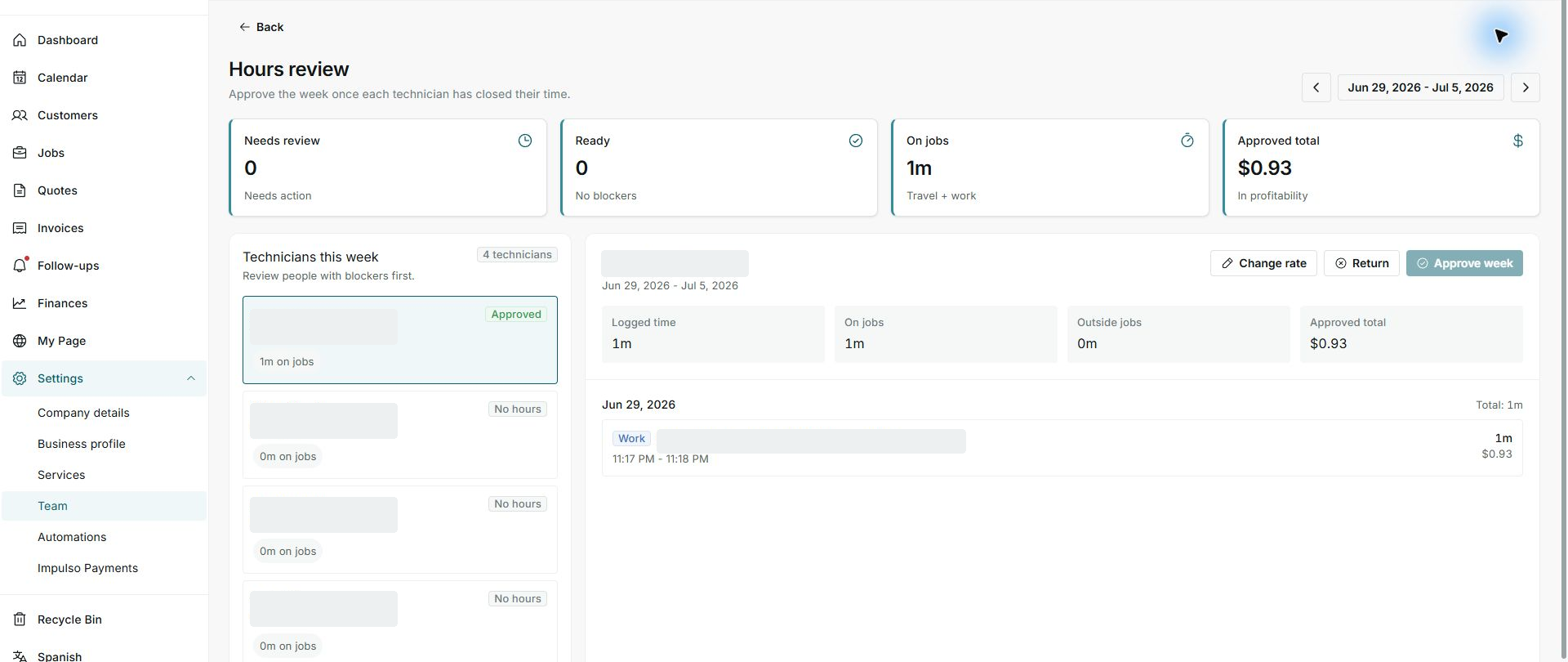
2. Review pending items first
- Check Needs review.
- Select people with pending items or unexpected no-hour weeks.
- Compare logged time with completed jobs.
3. Use actions carefully
- Change rate affects the approved cost.
- Return sends the week back for correction.
- Approve week closes the review when you are ready.
Statuses and options you may see
- Change rate
Meaning: Adjusts the rate used in the review.
Next step: Use this action only when the rate is wrong.
- Return
Meaning: Sends the week back for correction.
Next step: Use this action if information is missing.
- Approve week
Meaning: Closes the week as approved.
Next step: Do this only after reviewing totals.
- Approved total
Meaning: Shows the cost of approved hours.
Next step: Compare it with profitability before closing.