

Before you start
- Know the work the customer will review: roofing, gutter replacement, HVAC, drywall, or the right service for your business.
- Make sure the quote is ready before opening the email.
- Do not include internal notes, private costs, or team instructions in the customer message.
- The final send action sends a real email, so review the text before using Send email.
1. Open the quote email
- Open the quote you want to send.
- Review status and total before preparing the message.
- Click Send and choose Email if that option appears.
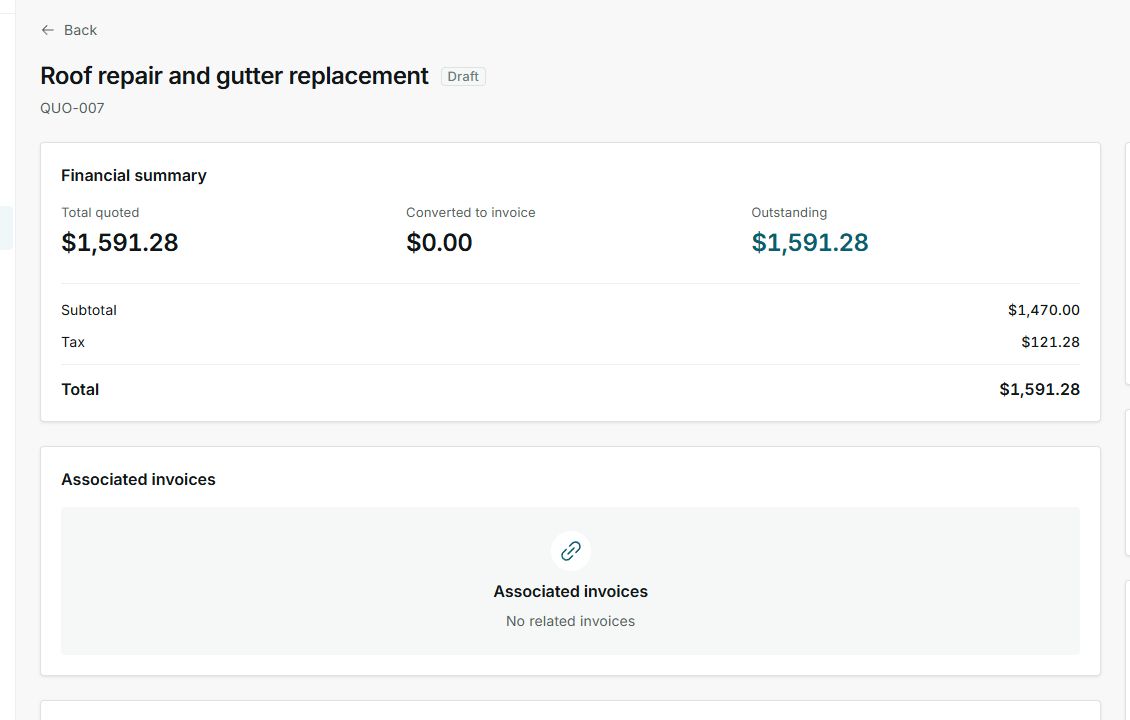
First confirm that the correct quote is open.
2. Customize subject and message
- Use a short Subject that mentions the job or property.
- In Message, explain that the quote is ready for review.
- Include the next step: review, approve, request changes, or reply with questions.
- Use the terms the customer expects, such as roofing, gutter replacement, or pressure washing.
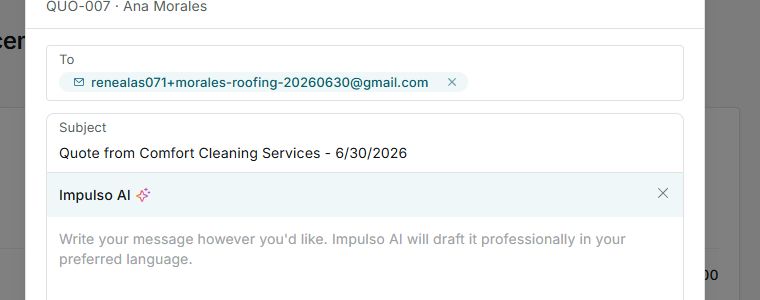
Subject and message are what the customer reads before opening the quote.
3. Review before sending
- Confirm the recipient is correct.
- Read the message as if you were the customer.
- Remove internal details, unclear abbreviations, or information that should stay inside your business.
- When everything is ready, use Send email.
Important
Only press Send email when the message is ready for the customer.
4. States and controls you can see
These controls tell you whether the message is still being prepared, has been sent, or needs correction before moving forward.