

Before you start
- Confirm you are in Finances before comparing amounts.
- Use period filters only when you need to review another month.
- Do not press Save, Export CSV, or Send when you are only reviewing information.
1. Review the main indicators
- Open Finances from the sidebar.
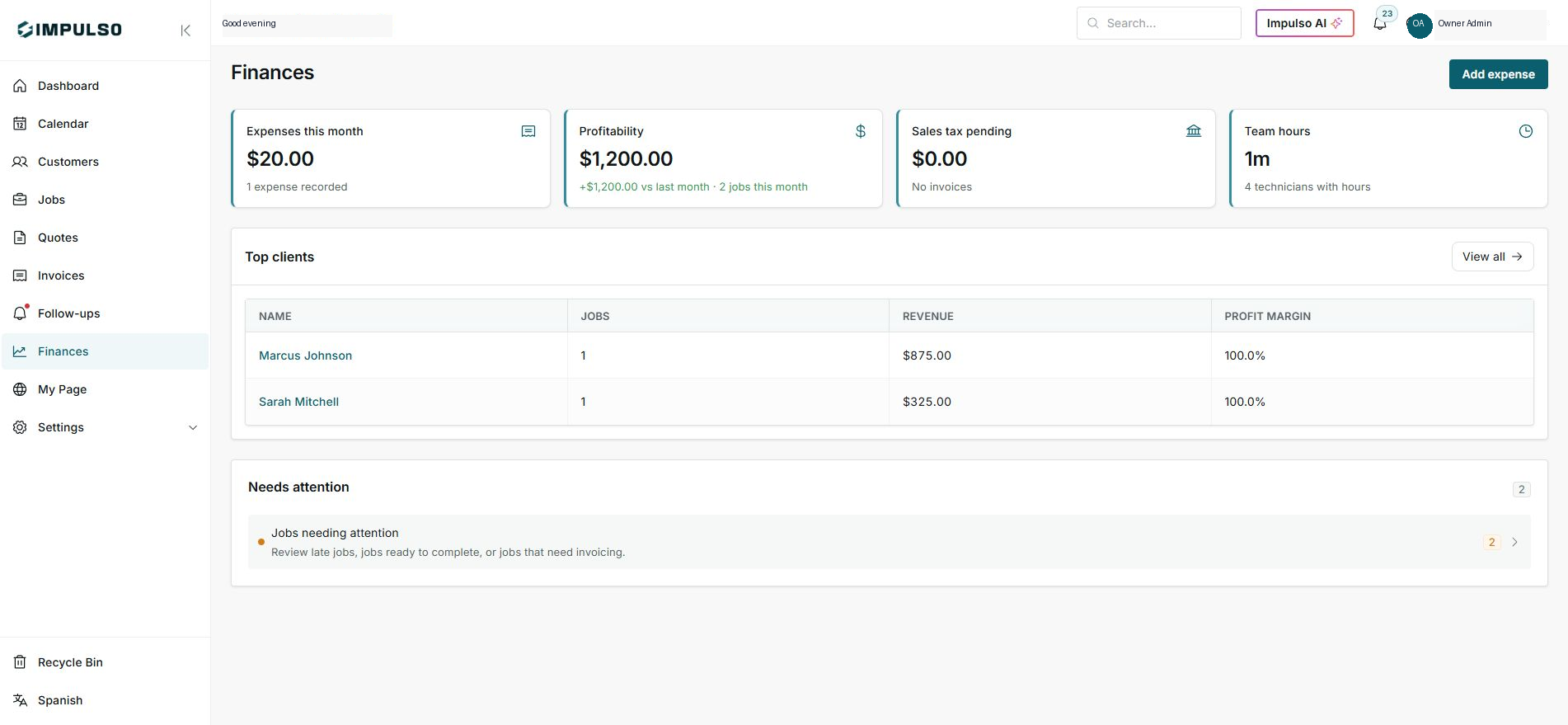
- Read the top cards from left to right: expenses, profitability, sales tax, and team hours.
- Compare the visible period before making decisions. In the screenshot, the data is for the current month.
2. Use Top customers to review revenue by customer
- In Top customers, review name, jobs, revenue, and profit margin.
- Use View all when you need the dedicated table.
- If a customer is missing, check whether the job or invoice belongs to the right period.
3. Work through operational items
- The Needs attention section summarizes late jobs, jobs ready to complete, or jobs that need invoicing.
- Open the row only when you are ready to review those jobs.
- After resolving jobs or invoices, return to Finances to confirm the numbers changed.
Statuses and options you may see
- Expenses this month
Means: Total expenses recorded in the visible month.
Next step: Open the card when you need vendor or category details.
- Profitability
Means: Summary of revenue, expenses, labor, and profit.
Next step: Use it to understand whether the period is profitable.
- Sales tax pending
Means: Sales tax still pending review with your accountant.
Next step: If an amount appears, review sales tax before reporting.
- Team hours
Means: Technician time recorded during the period.
Next step: Review hours if labor does not match expectations.
- Needs attention
Means: Jobs that need operational review.
Next step: Open them before closing the month.