

Before you start
- Use this flow only when the money was already received or when you will collect a card payment by phone.
- For manual ACH, first confirm that the transfer reached your account.
- A manual record does not replace the online payment the customer starts from an invoice.
1. Open Register payment
- Open the invoice with a balance due.
- Click Register payment.
- Review the balance, date, and amount before choosing a method.
2. Choose the correct method
- Choose Cash, Check, ACH bank transfer — already received, or Other based on what you actually received.
- Card is the phone-payment option and is available only when that feature is enabled.
- Do not choose ACH if you are still waiting for the customer to complete a transfer.
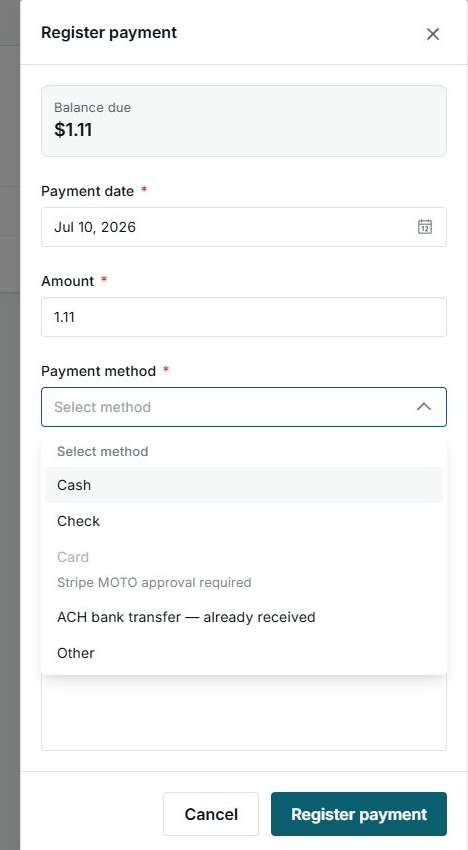
What ACH already received does
ACH bank transfer — already received records a payment that happened outside Impulso Pro. It does not start a bank debit and does not save the customer's bank account for later use.
3. Review and record
- Confirm the date, amount, and receipt email.
- Collect the customer's signature when appropriate.
- Click Register payment only when all information is correct.
- Then review payment history and the invoice's new balance.
Options you may see
- ACH already received
Meaning: The money already arrived by bank transfer.
It does not mean: Impulso Pro will start a debit.
- Card unavailable
Meaning: Card collection by phone is not enabled yet.
Next step: Use another method already received or follow up with support/Stripe.