

1. Read the Invoice List
The list shows invoice name, customer, due date, status, and amount. The summary tiles help you prioritize collections.
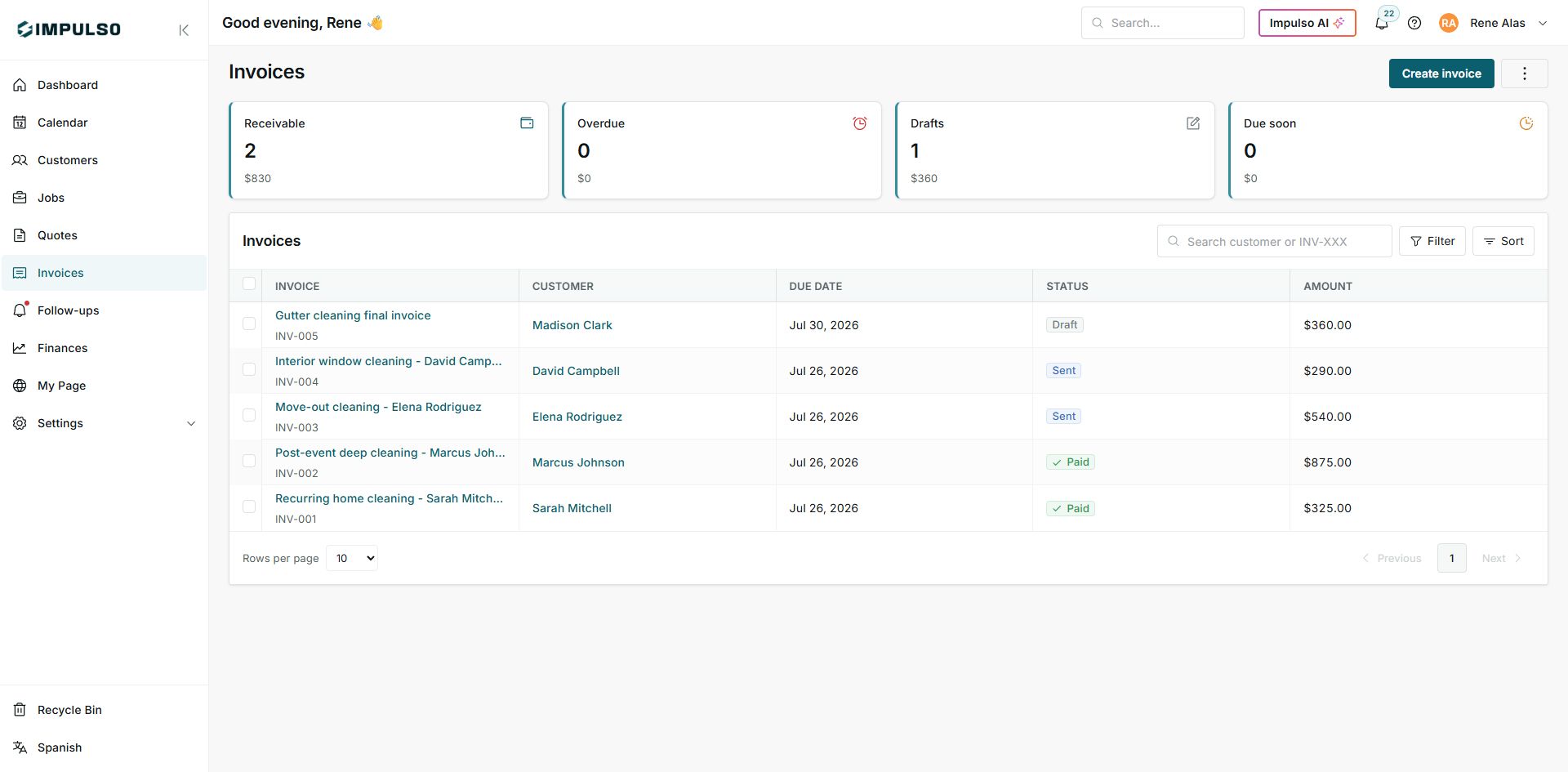
States You May See
- Draft
Meaning: The invoice exists, but it has not been sent yet. Where it appears: Invoice row and Drafts summary. Next step: Review and send when ready. It does not mean: It does not mean the customer received it.
- Sent
Meaning: The invoice was sent and may still need payment. Where it appears: Invoice row. Next step: Follow up or record payment when appropriate. It does not mean: It does not mean it is paid.
- Paid
Meaning: The invoice has no remaining balance. Where it appears: Invoice row. Next step: Keep receipt or history if needed. It does not mean: It does not automatically change other documents.
- Receivable
Meaning: Total sent invoices with open balance. Where it appears: Top summary tile. Next step: Prioritize payment follow-up. It does not mean: It does not include paid invoices.
- Overdue
Meaning: Invoices past due with open balance. Where it appears: Top summary tile. Next step: Contact the customer or review the agreement. It does not mean: It does not mean payment failed.
- Due soon
Meaning: Invoices approaching the due date. Where it appears: Top summary tile. Next step: Follow up before they become late. It does not mean: It does not mean they are already overdue.