

Before you start
- Confirm you are on the right job before editing or creating documents.
- Do not save, edit, invoice, or add visits when you are only reviewing.
- Use real US-market service names such as roofing, gutters, HVAC, or exterior painting.
1. View statuses in the list
- Open Jobs.
- Review the Status column.
- Compare the Visit column with the status badge.
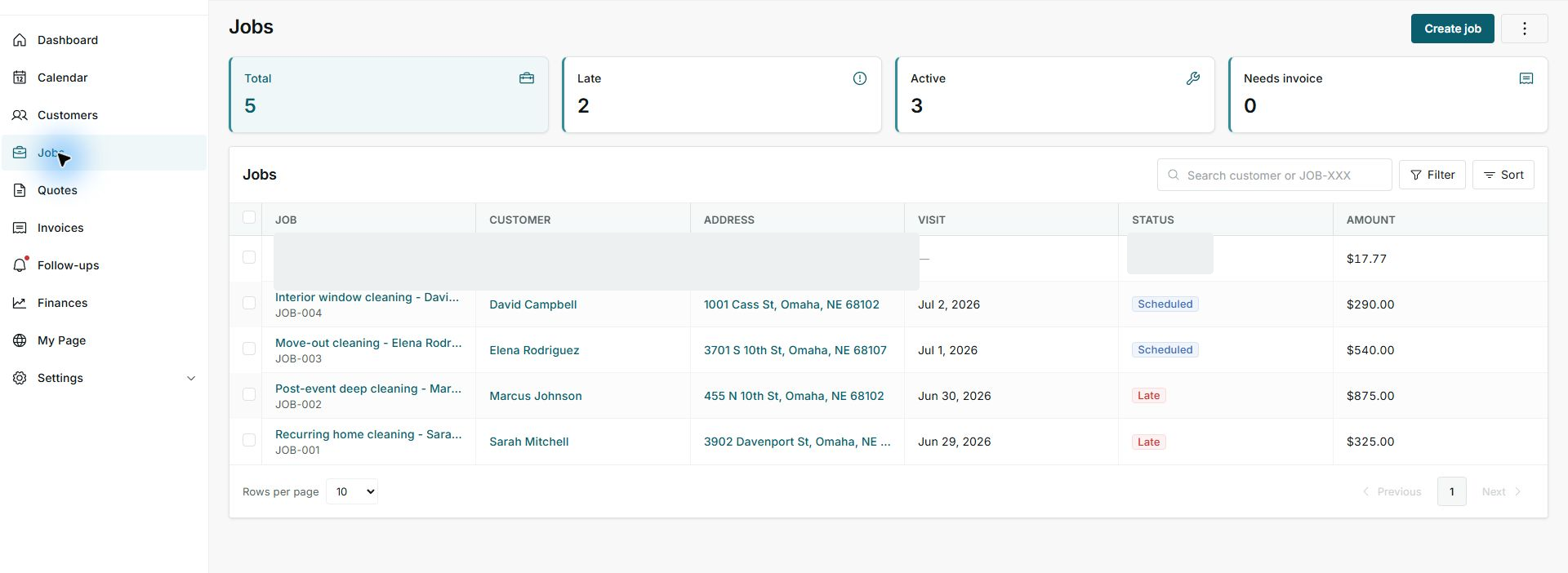
2. Read top cards
- Total summarizes visible jobs.
- Late shows jobs needing attention.
- Active shows open jobs.
3. Act based on status
- Scheduled usually means reviewing date and team.
- Late needs operational follow-up.
- Needs invoice means prepare billing when appropriate.
Statuses and options you may see
- Scheduled
Meaning: Has a planned date or visit.
Next step: Confirm time and assignment.
- Late
Meaning: The date has passed or needs follow-up.
Next step: Prioritize review.
- Active
Meaning: Still open.
Next step: Keep following up until closure.
- Needs invoice
Meaning: Needs billing or an invoice document.
Next step: Create an invoice when the job is ready.
- Total
Meaning: Count of visible jobs.
Next step: Use it for general control.