

Before You Start
- Open the customer from Customers or from a related quote, job, invoice, or follow-up.
- Use this page to review information before editing details or creating a new action.
- If you are going to change contact details, address, or notes, confirm you are on the right customer first.
1. Review the Customer Header
- Confirm the customer name at the top of the page.
- Review the state next to the name, such as Inactive.
- Use Back to return to the list when you only needed to check details.
- Use Add tag, Edit, or Schedule follow-up only when you want to take that action.
2. Read Properties and Activity
- In Properties, review the customer's service address.
- The Primary badge marks the main address to use first for visits and documents.
- In Activity, switch between Open and History to see pending work or past activity.
- In open quotes, review title, valid-until date, state, and total before opening the quote.
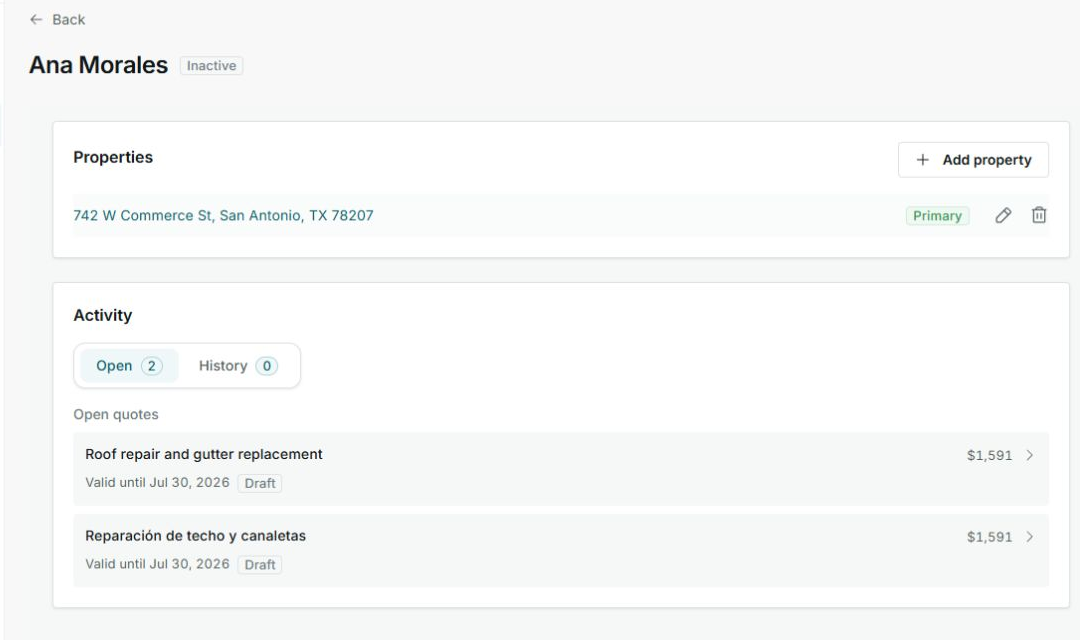
This example shows an inactive customer with one primary address, two open items, and draft quotes.
3. Check Contact, Notes, and Payments
- In Contact information, confirm client-since date, phone, email, source, and notes.
- If source or notes are missing, you will see a dash. You can complete them later from Edit.
- In Recent payments, check whether payments are recorded before following up on invoices or balances.
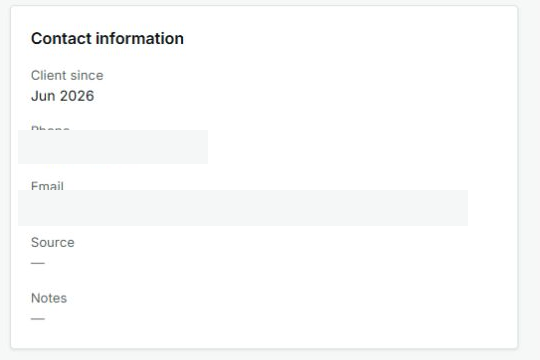
Phone and email values are hidden in this guide; in your account, you will see the customer's real details.
4. States and Controls You May See
These badges and controls help you decide what to do without opening records you do not need.
- Inactive
Meaning: the customer is not shown as active right now. Next step: review open activity before creating something new. It does not mean: you should delete the customer.
- Primary
Meaning: this is the customer's main address. Next step: use it for visits, quotes, and jobs. It does not mean: the customer cannot have more properties.
- Open
Meaning: there is pending or active work. Next step: review quotes, jobs, or follow-ups before duplicating work.
- History
Meaning: this shows past activity. Next step: use it to understand what already happened with the customer.
- Draft
Meaning: the quote is not finished or sent yet. Next step: open the quote if you need to review, complete, or send it.
- No payments recorded
Meaning: there are no recent payments tied to this customer. Next step: review invoices if you expected to see payment activity.
5. Choose the Next Step
- Use Edit if you need to change customer details.
- Use Schedule follow-up if you want to remember a call, visit, or next action.
- Open a pending quote if you need to review price, scope, or expiration.
- Return to Customers if you only needed to check information.